





Export Data#
This exports the raster data into a variety of raster formats, including ENVI, ER Mapper, GeoTIFF, Geosoft GXF and Surfer. In most cases the GDAL library was used.
The user has the following options:
Output File - Select the locality, filename and format of the output file.
Output Bands - Select the bands to export by clicking on them. Bands highlighted in grey will be exported. A band can be deselected by clicking on it a second time.
Sort output bands - The output bands can be sorted by band name.
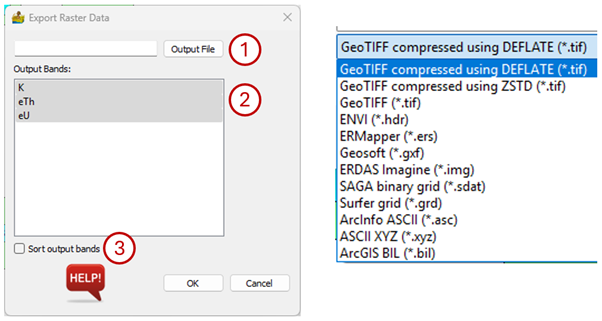
Export Raster Data interface and the formats to which the data can be exported.#
Note that if the dataset to be exported is an RGB image, the output bands will be labelled red, green, blue and alpha, and cannot be sorted.