





Vector Equation Editor#
The Vector Equation Editor allows for script operations to be performed on channels in a vector dataset. It makes use of the powerful numexpr library with pandas for the scripting.
The interface consists of the following:
Output Equation box where the equation is typed out. The variables i0, i1, i2 etc. represents the channels of the input vector dataset in formulas.
New Column Name box where the new column name can be set.
Data Band Key combo box. It shows which band is assigned to each variable. By clicking on the dropdown arrow, all the channels in the data set are listed. When selecting a channel, the variable associated with the channel is shown to the right of the combo box. The variable name is for information purposes only; the user must type the equation manually in the equation box.
Examples of some commonly used equations and Commands that are available.
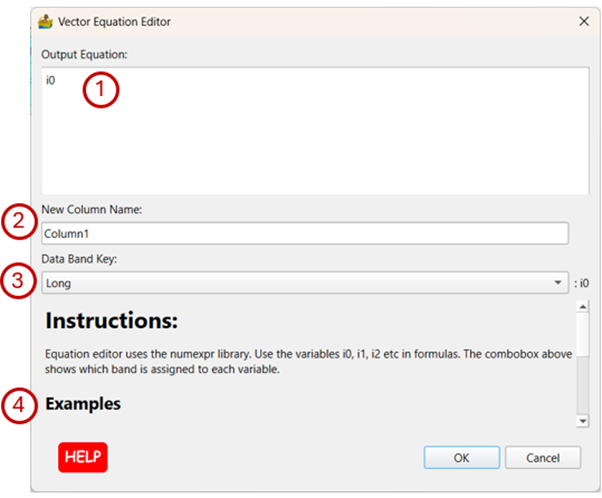
Equation Editor interface.#
Examples:#
Sum:
i1 + 1000
Commands:#
Comparison operators: <;, <=, ==, !=, >=, >
Arithmetic operators: +, -, *, /, **, %
sin, cos, tan, arcsin, arccos, arctan, sinh, cosh, tanh, arctan2, arcsinh, arccosh, arctanh
log, log10, log1p, exp, expm1
sqrt, abs